

Most conversations about automating something start in the wrong place: should we use AI for this? It is a hard question because it is the wrong size. A process is not one thing — it is six or eight steps in a row, and they are not all the same kind of work. There is a smaller question, asked of each step on its own, that answers itself.
The one question to ask of every step
Does this step need someone to read it and decide — or does it always do the same thing, given the same input?
If it needs a judgement, the kind a competent person makes in two seconds but could never quite write down as a rule, that step wants AI. If the action is fixed and repeats without variation, that step wants plain code.
That is the whole rule we build by. We use AI where a step needs human-like judgement — deciding what to do with an email that has just arrived. We use plain code where the action is fixed and repeats — applying a specific tag once the category is known.
The ratio is what surprises people. In the systems we build, a working automation is mostly a long run of boring, predictable code, with one or two points in it where a judgement has to be made — and those are the only places the AI goes.
Everyday examples, side by side
These pairs are from ordinary small-business operations. Notice how often the judgement and the fixed rule sit next to each other in one process: the first is the decision, the second is what happens once it is made.
| Needs a judgement — use AI | Always the same, given the input — use code |
|---|---|
| Working out what an email that just arrived is actually about | Applying the tag and filing it once the category is known |
| Turning a customer’s description of the job into a structured list of what they want | Multiplying those quantities by your rates and adding GST |
| Reading a request that says “sometime late next week, mornings if possible” | Checking that slot against the calendar and holding it |
| Pulling the amounts and dates out of a supplier invoice that arrived as a PDF | Checking the total against the purchase order and flagging a mismatch |
| Deciding whether a website enquiry is a real job or a sales pitch | Emailing the alert to whoever is on call today |
| Summarising a signed document so somebody can catch up in twenty seconds | Renaming the file, storing it, and recording who signed it and when |
| Explaining in a sentence why last week’s numbers look odd | Adding the week’s numbers up and drawing the chart |
If you can write the rule down — “if the invoice is over $5,000 it needs a second signature” — you do not need AI for it, and putting AI there makes it slower, dearer and less predictable than the two lines of code it deserves.
The corollary most explanations miss: code decides when to trust the AI
When our email sorter asks the AI to categorise a message, it does not just ask for the category. It asks for a confidence score from 0 to 10 alongside it — how sure the model is that the category is right. What happens next is not the AI’s decision at all: it is a line of code comparing that number against a threshold you set, which defaults to 7. Score seven or higher and the message is filed automatically. Below that — or where the model could not match any of your categories — nothing is moved. The email stays in the inbox and appears in the digest under a heading asking what to do with it.
That gate is the difference between a demo and a system you can leave running. The AI is allowed to be uncertain, because uncertainty has somewhere to go: a person. You are not betting your filing on the model being right every time — you are betting that when it is unsure it says so, and the code around it is what makes “unsure” mean “ask a human” rather than “guess anyway”. Raise the threshold and more lands on your desk; lower it and more happens without you. That dial is yours.
The worked example: our own email digest system
We run this on our own mail, and it is the clearest illustration we have. Five steps. Exactly one of them is AI.
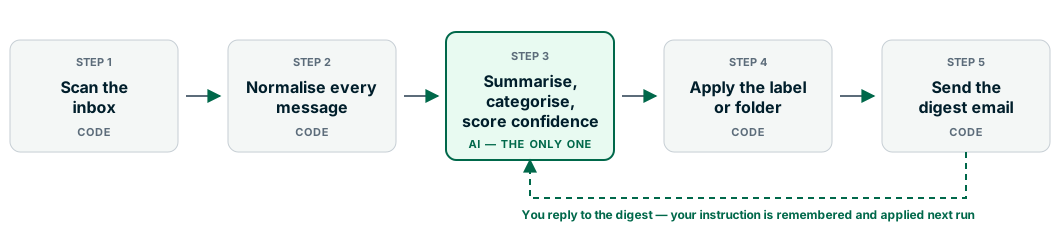
1. Scan the inbox — code. On a schedule, it asks the mail server for everything that arrived since the last run: on Microsoft 365 a filtered request to the Graph API for the inbox, on Gmail an IMAP search opened read-only so it does not mark your unread mail as read. No judgement whatsoever. It is a query with a date on it.
2. Normalise every message — code. Whichever provider it came from, each message becomes one record with the same fields: when it arrived, who sent it, the subject, the thread it belongs to, the body converted from HTML to plain text, and a link back to it in your webmail. It is stored once, under a uniqueness rule on the message ID, so a re-scan can never duplicate anything. Again no judgement — this is the plumbing that lets the next step be simple.
3. Summarise, categorise and score — AI. The only step where something has to be understood. In one call, for each email, the model writes a one-line summary of what it says and what it asks of you, picks the single best-fitting category from your own list, and gives that pick a confidence score out of ten. It sees the earlier messages in the same thread, so a two-word reply is read in context rather than in isolation.
4. Apply the label or folder — code. Take the category the AI returned, check the confidence against the threshold, move the message: on Gmail, apply the label and archive it out of the inbox; on Outlook, move it to the folder, creating that folder if it does not exist yet. A failed move is logged and the message left where it was, rather than recorded as filed. Zero judgement — the decision was made in step 3; this step only carries it out.
5. Send the digest — code. The digest email is assembled by ordinary code from the database: one table of what was filed automatically, with its category and confidence, and one table of what needs your instruction. A message is only marked as reported once the send has succeeded, so a failed run repeats itself next cycle instead of quietly swallowing a day’s mail.
One detail usually gets glossed over: the AI writes the summaries, it does not write the digest. Your email is built by code from the AI’s results, so it looks the same every day — exactly what you want from something arriving before breakfast.
The reply-to-teach loop
When you see something under “needs your instruction”, you reply to the digest in a sentence — anything from our accountant goes in Finance, they do our BAS. The next run picks that reply up, strips the quoted text, keeps it verbatim in a log, and compacts it into a short working memory of everything you have ever told it, in which a newer instruction overrides an older one that contradicts it. That memory reaches the model before it scores anything, and the emails flagged last time are re-assessed in light of it.
So it gets better at your mail because you told it something, in one sentence, in a reply — not because anyone retrained a model, and not because it quietly decided something on its own. The memory is a plain text file you can open and edit if it ever learns something wrong. The human stays in charge, which is the only arrangement we are willing to leave running unattended.
(For completeness: the module makes two other AI calls outside that per-email path — one to compact your instructions when a reply arrives, one to describe a folder it has not seen before. Both are judgement work too. The point was never that a system contains exactly one AI call, but that each call sits where a human would otherwise have had to read and decide.)
The same shape, with the filing step writing into accounting and ERP systems instead of mail folders, is what we built for the operations manager in this email triage case study.
Why the split matters
Cost. Every AI call costs money and takes a second or two; code costs effectively nothing and takes a millisecond. Put the model on all five steps and you have multiplied the bill and the runtime to have it do file moves it is worse at than a loop.
Reliability. Deterministic code is testable: the same input gives the same output today, next month, and after a model update. Not a small thing when the step in question is “move this customer’s contract into the right folder”.
Auditability. When something goes wrong you want to know which step decided what. With one judgement point you can answer that in seconds: the category and confidence are recorded next to the email, and everything downstream is mechanical. If the model had a hand in all five steps, “why did this end up here” becomes a research project.
And the honest caveat. AI steps will occasionally be wrong. Ours sometimes picks a sensible-but-not-your-preferred category — which is exactly what the confidence gate and the human loop are for. The cost of a mistake is one line in a digest that you correct in a sentence, not a contract filed where nobody finds it for a year.
A checklist for your own process
Write the process out as numbered steps, then ask of each one:
- Could you write the rule down? If yes, it is code. No exceptions.
- Would a new staff member have to read the content to do it? If yes, that is your judgement step — the AI goes there.
- What does getting this one wrong cost? A high cost means a confidence gate and a person, not more clever prompting.
- How would you know it went wrong? If there is no answer, build the digest before you build the automation.
- Who fixes it when it does? There has to be a name, and a correction that takes a sentence rather than a support ticket.
What we would not use AI for
Calculating a quote total from your rates. Deciding whether an invoice is overdue. Checking a licence number against a register. Sending the reminder. Moving the file. Backing anything up. Those are rules, and a rule a model “usually” gets right is worse than one that is simply right — cheaper to run, easier to test, explicable to a customer.
If you are not sure where the judgement actually sits in something you want automated, that is the conversation worth having. See AI workflow automation for the kind of work this covers, or our post on website chatbots if the step you want handled is answering what visitors ask your site. Then get in touch and walk us through the process — we will tell you which steps need a model and, more often than not, which ones never did.